
GameStrat Drone Compatibility for In-Game Replay
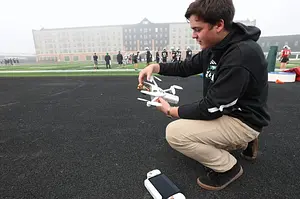
Drones are becoming more and more popular in the football film world, mainly because of the angle they give you. That "eye in the sky" overhead view makes it easier to see spacing, alignments, and concepts in a way a standard sideline or endzone camera just can’t.

If you’re already using a drone for your game film, you might be wondering:
Can that drone work with GameStrat's in-game replay in a live game?
The short answer is yes, as long as your drone controller can output video feed through an HDMI port.
Many DJI drones can fly with different controllers, but only certain controllers are built to output a live video feed that GameStrat can use.
That’s the only requirement.
Just like Hudl Focus connects to GameStrat using an Ethernet cable, drone setups connect to GameStrat using a direct HDMI video output from the controller.
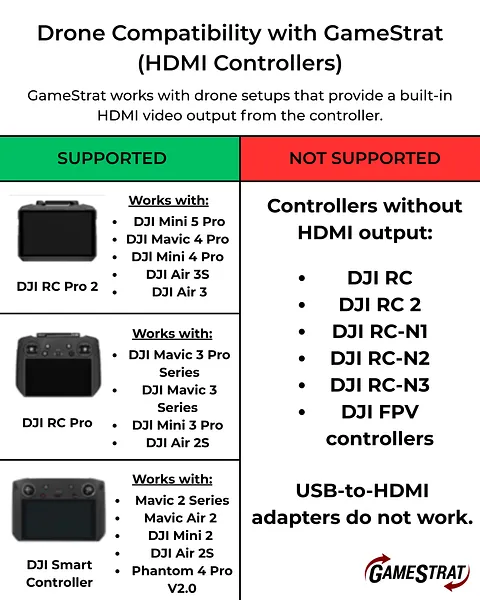
According to DJI’s own compatibility charts, here are the controllers that work best for this type of setup:
- DJI RC Pro 2
- DJI RC Pro
- DJI Smart Controller
Any drone system, including non-DJI models, can be used with GameStrat as long as the controller provides a live HDMI video output.
For example, other drones like the Autel EVO II Pro V3 from Autel Robotics can also be used with GameStrat when the controller includes HDMI video out.
Just like with DJI setups, the deciding factor is not the drone itself, it’s the controller.
If the controller has a true HDMI output, GameStrat can ingest that feed the same way it would any other camera source. Adapters do not work for this. The controller must have a built-in HDMI output. USB-C ports and USB-to-HDMI adapters will not provide a compatible video feed for GameStrat.
Once you have one of these drones/controllers, the setup is simple. Plug the HDMI output from the controller into your GameStrat system, select the feed, and you’re ready to use that overhead angle for in-game or practice replay.
Have any specific questions about drones that we didn’t cover here, or want some help making sure your setup will work with GameStrat?
Feel free to reach out to our support team at support@gamestrat.com or give us a call at 1-800-783-1968 x1. We’re always happy to take a look at your exact drone and controller setup before game day.
Previous Post
Benefits of Doing a GameStrat Demo: Seeing The System In Action
Benefits of Doing a GameStrat Demo: Seeing The System In Action
See why a live GameStrat demo makes the difference. Experience instant replay speed, simple setup, stadium-specific solutions, and clear pricing.
Jan 27, 2026Next Post
Dexter HS, MI - Case Study
Dexter HS, MI - Case Study
Dexter High School football explains why they switched from Hudl Sideline to GameStrat and how it improved reliability, setup, and overall use of the system.
Mar 10, 2026